Deployment example
Watcher runs as Docker containers in your environment. These diagrams show the two authentication paths into the same stack.
WorkOS authentication
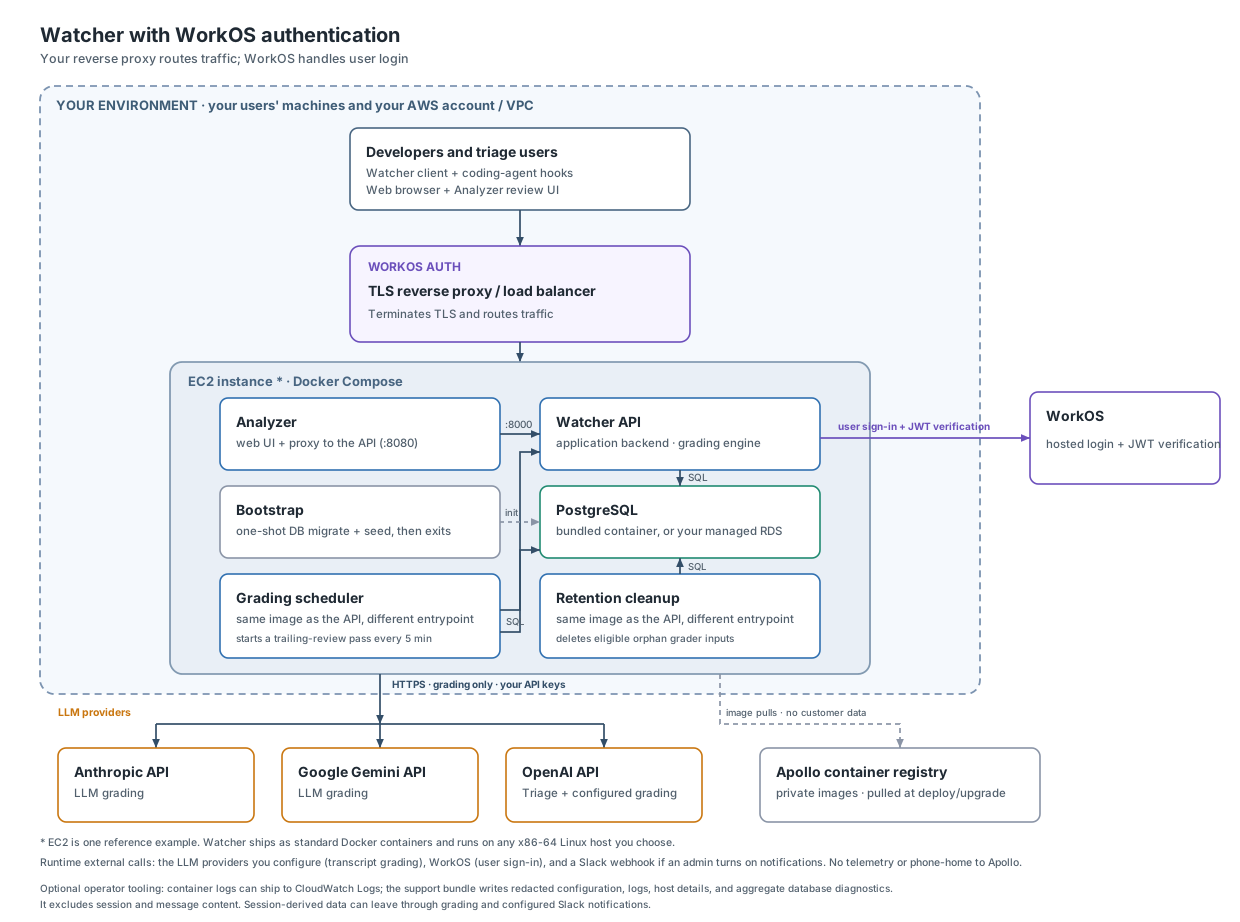
Your reverse proxy terminates TLS and routes traffic. WorkOS handles login.
Bring your own authentication
Your reverse proxy authenticates each request, removes untrusted identity headers, and adds the trusted user and role headers Watcher consumes. Watcher does not connect to WorkOS on this path.

The stack contains the Analyzer, API, database, bootstrap container, and retention cleanup worker. It also runs the grading scheduler when trailing review is enabled. The always-on retention worker deletes grader inputs that have remained unlinked to a tool-call decision for more than eight days, and enforces any enabled organization session-content retention policy. The session policy is disabled by default. Organization administrators configure a period between 7 and 365 days through the Analyzer's Data Retention controls or the organization settings API; disabling the policy retains session content indefinitely. Both workers run the API image with separate entrypoints.
See Setup for installation, Security for data flows, and Supply chain security for artifact controls.